Article
Revenue Dashboard Does Not Match Finance: What to Check First
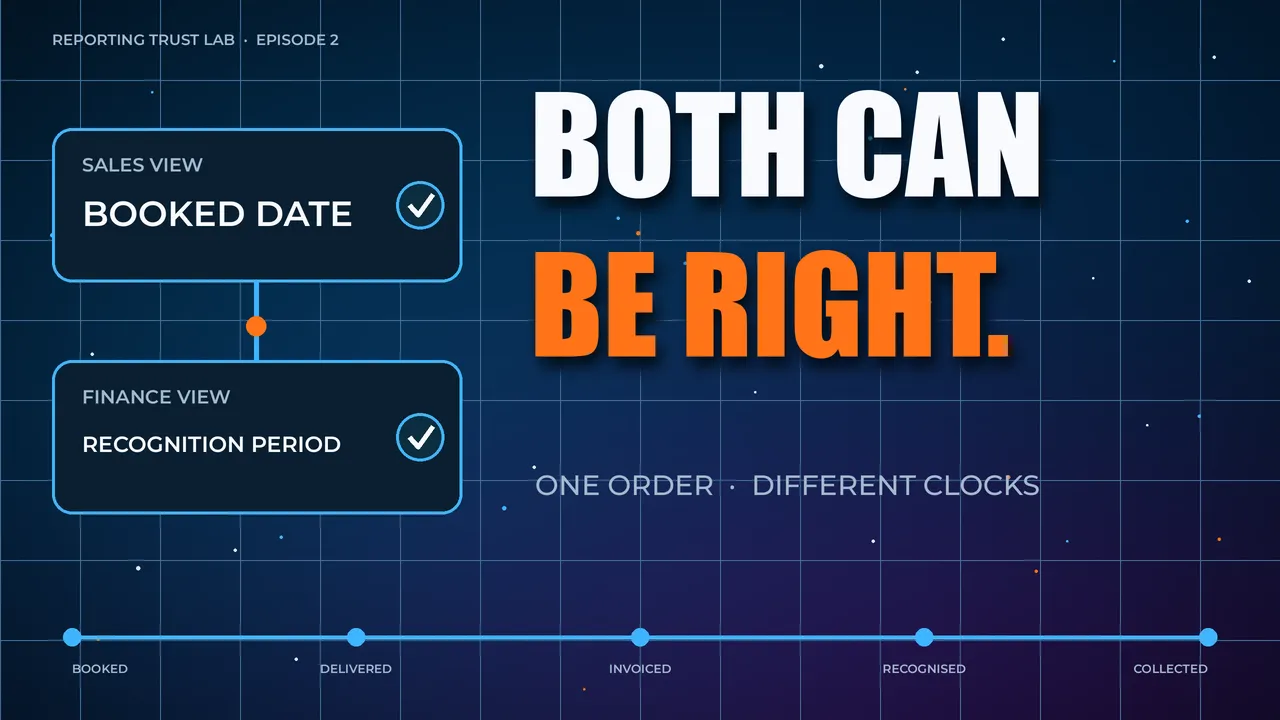
Finance says revenue is one number. Sales says it is another.
The board pack, CRM dashboard, spreadsheet forecast, and finance report all look credible, but they do not agree. The meeting slows down because people stop discussing the decision and start debating the number.
This is one of the most common reporting trust problems in a growing business.
It is also one of the easiest problems to misdiagnose.
Finance and sales often disagree because they are not measuring the same moment in the commercial process. That does not mean one team is careless or one system is broken. It usually means the business has not made the reporting context explicit enough.
If your revenue dashboard does not match finance, the first move is not to rebuild the dashboard. The first move is to work out whether the dashboard and finance pack are supposed to answer the same question.
Finance vs sales: why the numbers disagree
Finance and sales use similar words for different jobs.
Sales may care about bookings, pipeline, order date, expected value, signed contracts, renewal risk, or forecast categories. Finance may care about invoices, credits, cash, revenue recognition, adjustments, tax, refunds, or month-end close.
Both teams can be right.
The reporting trust problem starts when those numbers appear under the same label. That creates a semantic gap between finance intent and sales intent.
For example, “revenue” can mean:
- Orders booked this month
- Invoices raised this month
- Revenue recognised this month
- Cash collected this month
- Forecast revenue expected to close
- Finance-approved revenue after credits and adjustments
Those are different business questions. If the dashboard does not name the difference, the disagreement looks like a data quality failure.
Check the decision before checking the data
The first check is not technical.
Ask what decision the number is supposed to support.
If the decision is a sales capacity discussion, the CRM view may be useful. If the decision is a board or finance reporting discussion, the finance-approved number may be authoritative. If the decision is a cash planning discussion, invoices and payments may matter more than bookings.
The right number depends on the decision.
This is why forcing finance and sales numbers to match can be the wrong first move. Sometimes the problem is not that the numbers differ. The problem is that the business is comparing two valid views as if they answer the same question.
For the broader pattern, read why your business numbers don’t match. If the issue is not just finance versus sales, but several teams using different revenue views, read what to do when every team has a different version of revenue.
Compare timing rules
Timing is the fastest place to find the mismatch.
Finance and sales often disagree because one report uses order date, another uses invoice date, another uses recognition date, and another uses payment date.
Check:
- Which date field is used?
- Does the report use created date, closed date, invoice date, payment date, or recognised date?
- Are late changes backdated?
- Are month-end adjustments included?
- Does the dashboard refresh before finance has closed the period?
- Are time zones affecting the cut-off?
A sales dashboard may update daily. A finance report may be closed after review. A forecast spreadsheet may include judgement about deals that have not yet reached the finance system.
Those differences should be visible.
Compare definitions
Next, inspect the KPI definition.
If both teams use the word “revenue”, ask what each report includes and excludes.
For example:
- Are refunds included?
- Are discounts included?
- Are credits included?
- Is tax included?
- Are cancelled orders included?
- Are partial invoices included?
- Are one-off adjustments included?
- Are renewals and new sales separated?
If the number is “customers”, ask whether it includes prospects, trials, signed accounts, paid accounts, active accounts, subsidiaries, churned accounts, or test accounts.
This is where a lightweight KPI definition is useful. It gives the business a shared way to compare meaning, ownership, timing, and caveats before changing reports.
If the same revenue metric is repeatedly disputed, use How to Diagnose a Disputed Metric to inspect the specific number before turning it into a wider reporting rebuild.
Inspect manual adjustments
Manual adjustments are not automatically bad.
Finance often needs judgement, corrections, accruals, credits, and month-end adjustments. Sales may need judgement about expected close dates, deal probability, contract nuance, or pipeline quality.
The problem is hidden manual logic.
Ask:
- Is finance changing the number after it leaves the source system?
- Is sales adjusting the CRM export in a spreadsheet?
- Is someone excluding known anomalies manually?
- Are cancelled, refunded, or delayed transactions handled outside the dashboard?
- Does only one person know why the adjustment exists?
If manual logic is important, it should be documented and named. Otherwise the business keeps rediscovering the same disagreement.
This becomes more important when AI tools are allowed to summarise revenue, pipeline, or forecast movement. If finance adjustments and sales caveats are not visible at the Semantic Layer Gate, AI may explain the wrong version of the number.
Trace the source-to-report path
If timing and definitions do not explain the difference, trace the path.
Find where the number starts, where it changes, and where it appears.
A simple source-to-report check asks:
- Which system creates the original record?
- Which system is treated as authoritative for this decision?
- Does the number pass through the warehouse, spreadsheet, finance system, or BI layer?
- Are filters, joins, or transformations changing the grain?
- Where do manual edits enter?
- Which report is used in leadership meetings?
If the path is unclear, use the source-to-report lineage explanation as the next starting point. When the same metric keeps causing disputes, a lightweight reporting contract can make the agreed definition, owner, caveats, and authoritative report explicit.
For the short definition, use what source-to-report lineage means. The practical question is simple: where did the revenue number begin, what changed before it reached the dashboard, and which version is safe for this decision?
Decide which number is authoritative for which decision
The goal is not to make every number identical.
The goal is to stop using ambiguous numbers for important decisions.
A practical outcome might be:
- Sales forecast: CRM pipeline view
- Sales activity: sales dashboard
- Month-end revenue: finance-approved report
- Board reporting: finance pack
- Cash planning: invoice and payment view
That distinction reduces repeated reconciliation work because people know which number belongs to which decision.
What not to do first
Do not ask the data team to “make the numbers match” before the business has agreed what the number should mean.
Do not rebuild the dashboard before checking timing, definitions, ownership, and manual adjustments.
Do not treat the finance spreadsheet as the enemy. It may contain important context that the dashboard needs to expose or reference.
Do not let both teams keep publishing numbers with the same label if they are answering different questions.
What to do next
Pick one disputed finance vs sales number.
Write down the decision it supports, the definition, timing rule, source system, owner, manual adjustments, and authoritative report. Keep the inspection deliberately lightweight. The goal is to stop the disagreement becoming a recurring meeting tax.
If the dispute involves multiple dashboards and spreadsheets, use the dashboard reconciliation checklist. For a lightweight first pass on one metric, use the Reporting Trust Scorecard. If this pattern is already consuming leadership time, read the Invisible Data Tax. If the next step is semantic-layer or AI work, read Reporting Trust vs Semantic Layer Trust.
The free opening chapter explains why trusted reporting has to come before more dashboards, automation, or AI. The full book goes deeper into the Reporting Trust approach, while the Reporting Blueprint Toolkit is for teams that need the working templates and artefacts.